
Export to Pdf on the Views tab opens a print preview rather than writing a file immediately, so the pagination can be settled before anything is saved.
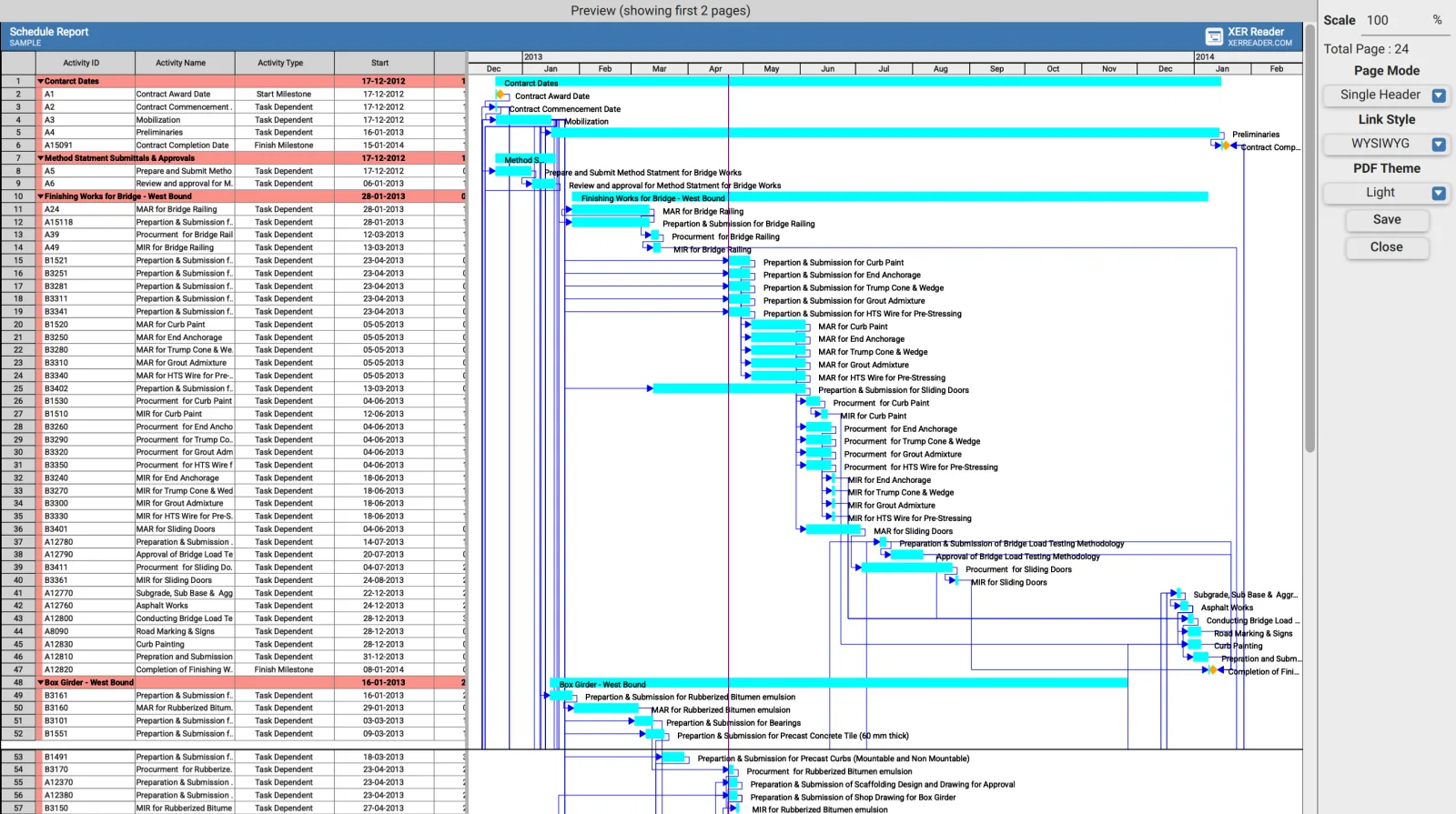
The preview is partial, the page count is not
The preview renders only the first few pages, and its heading says how many it is showing. Total Page is the real figure for the whole export. Judge the fit from that number rather than from what is drawn.
Controls
| Control | Effect |
|---|---|
| Scale | A percentage, 100 by default. Lower fits more on each sheet |
| Total Page | How many pages the current settings produce, updated as you change them |
| Page Mode | Repeat Header, Single Header or Fit Tasks |
| Link Style | WYSIWYG or Full Links |
| PDF Theme | Light or Dark |
| Save | Writes the PDF |
| Close | Leaves without writing |
Page Mode
| Mode | Produces |
|---|---|
| Repeat Header | The column headers on every sheet. Normally what a printed programme needs |
| Single Header | Headers on the first sheet only |
| Fit Tasks | Pagination arranged around the activities rather than a fixed page split |
Link Style
| Style | Produces |
|---|---|
| WYSIWYG | Relationship lines as drawn on screen, following the Gantt settings in use |
| Full Links | Relationship lines drawn in full, including those running off the visible area |
Fitting a schedule to pages
Set Page Mode first, then adjust Scale while watching Total Page. The count updates as the scale changes, which reaches a sensible sheet count faster than saving and checking.
The PDF matches the view
The export reflects the table as it stands. Filtered activities are absent, hidden columns are absent, collapsed groups print collapsed, and the applied grouping and Gantt bar settings are all carried through. Set the view up before opening the preview.
Vector output
The PDF is vector rather than a screenshot, so it stays sharp when printed at plotter sizes or zoomed. Text remains selectable and searchable in a PDF reader.